Showing posts with label Microcontroller. Show all posts

Monday, January 19, 2015

RTC using Ds1307 and 89c52 with Multiplex 7-segment display

2 comments:

  RTC using Ds1307 and 89c52 with Multiplex 7-segment display

Salam ....Friends in this tutorial ,we are interfacing real time clock Ds1307 with 89c52 and displaying time on multiplex 7-segment display .In google there are many related projects about the Real Time Clock but no one use the 7-segment display so my method  is different and less expensive ,because i don't use the crystal LCD. step1 is about RTC and I2c .

RTC  is an electronic device which  plays an essential role in realtime embedded system design. It provides a  precise time and date in various applications such as system clock, student attendance system and alarm etc, that keep track on current time and provides consistent result to the respective task. This article presents RTC interfacing with 8051microcotrollerand basic accessing of internal registers.

RTC Programming and Interfacing

RTC  interfacing with 89c52 microcontroller is similar to all other kinds of  “Real Time Clocks” interfaced to it. So let us look on simple RTC interfacing with 89c52 microcontroller and programming procedure involving in it.

Step1: Select RTC Device

The various kinds of RTC chips are available in the real time embedded world, which are classified based on various criteria such as package type, supply voltage and pin configuration etc.  A few types of RTC devices are;
  • Two-Wire Serial Interface (I2C Bus)
  • Three-Wire Serial Interface (USB BUS)
  • Four-wire Serial interface (SPI BUS)
First, we need to select type of RTC device by category based on requirement like I2C Bus RTC or SPI Bus RTC or other, which suitsfor interfacingwith respective microcontroller. Then we can select features of RTC device depending on requirement of application such as battery life, suitable package and clock frequency. Let us consider two-wire interfacing RTC with 8051 microcontroller such as DS1307.

Sunday, March 30, 2014

Ultrasonic Distance Finder By Using 89c51

No comments:

Ultrasonic Distance Finder By Using  89c51

                                                       Bismiallah Hirahman Niraheem 


As you see below there are two code one is main code and another is a external function code and this is for serial transmit ...when main code call this function then serial transmission is occur .
Important thing is that i use cyrstal oscillator of   11.0592 Mhz    for serial communication ...12Mhz oscillator not worked .


Tuesday, March 18, 2014

GETTING STARTED WITH 8051/AT89C51 USING KEIL uVISION 4 AND PROTEUS

No comments:

In this step-by-step tutorial you will find:


--Basic connection diagram of 8051 micro-controller

--Stuff about how to write your very basic program for 8051 micro-controller using Keil uVision software and making final .HEX file with it 

--Using Proteus simulation software to simulate 4-bit counter circuit behavior and program

-- A example video showing 4-Bit counter program

Basic connection diagram of 8051 micro-controller

Notes:
-Do not forget to connect EA pin to 5V as this pin can not be left unconnected.
-30pF capacitor are most suitable but their unavailability has moved me use 20pF capacitors.

USING KEIL uVISION 4.0 TO WRITE CODE


1)As you will open Keil software , you will see following screen:
2)Create new project as shown below:
3)Name it. Make sure that you already have made the separate folder to minimize confusion of new project files with old ones. New folder will keep all files related to only to one project hence making it easy to locate files you need afterwards.

4)Select chip manufacturer, in our case Atmel then select chip model i-e AT89c51


5) Software will ask you whether to include 8051 start up code, select NO.

6)This is how you working environment should look like till now:

6) As new project folders are created, now it is time to create a text file which will include your assembly code. Goto file drop down menu and select "New" or simply click blank paper icon in file toolbar.


7) Write your code in the new white work space that just has been created.
8) Its time to save your  assembly code file now. Go to file drop down menu and select save. Save the file into your main project folder.
NOTE: SAVE FILE WITH .ASM EXTENSION AS OUR CODE IS IN ASSEMBLY LANGUAGE.
As you will save the file, the software will detect the .asm language keywords and they become colorful to make them prominent from rest of code. 

9) Now you have to add .asm code file to your project. Right click on the source group folder(sub-folder of main target1 folder) and select "Add files to group (source group)"

10) A small window will appear asking you for location of your .asm code file. Give it the path of wherever you have saved your file, it should be in  your project folder. Select the file click "Add".


11) You may check the .asm file by clicking on the little plus sign at the left of source group.

12)There are some configuration changes that you have to make before you build the final .HEX file. 

-In target tab set the frequency that you are using with 8051, in our case 10.0MHz. So change default value 24.0MHz to 10.0Mhz

-In output tab check the "Create HEX file" box otherwise HEX file will not be created.
After all these settings click OK.

13) Its now time to get final output that HEX file.
Right click on .asm file which is in source group folder and select "Build target" .

14)If there are no errors in code your code will be compiled in couple of seconds showing progress in window at the bottom.
If there are errors in code then they will also be mentioned in same bottom window with number of line that contains error. You may recheck that line rectifying the mistake(s).

15) After successful compilation of code you can find final HEX file in same project folder that contains main project file/asm file/other files.

USING PROTEUS TO SIMULATE  4-BIT COUNTER CIRCUIT

Important: As Proteus does not bound us to connect power supply, XTAL,reset circuit,EA pin and other basic connections so we are ignoring them for sake of simplicity. The important things like Xtal frequency of micro controller can be set from properties of micro controller, as discussed below.

While in actual hardware form for you must follow basic circuit shown at very beginning of this post.


1) Open Proteus


2) Click on "P" to open up part list.
Locate AT89C51 IC as shown below:


3) Locate LEDs as shown below


4) Make connections from 8051 to LEDs


5)Locate GND terminal as shown below

6) Connect all LEDs to GND


7) Double click on 8051 IC to open up its proerties window.

--- Set the operating frequency i-e 10.0MHz
--- Give controller the desirewd HEX file.


8) Click on Play Button to start simulation


CIRCUIT SHOULD START WORKING AS SHOWN BELOW

4-BIT COUNTER CODE:


;------4 bit counter code
ORG 0
MOV P1,#0
BACK1: MOV A,#0
BACK: MOV P1,A
INC A
ACALL DELAY
CJNE A,#15,BACK
SJMP BACK1

DELAY:  MOV R1,#45
H3: MOV R2,#100
H2: MOV R3,#100
H1: DJNZ R3,H1
DJNZ R2,H2
DJNZ R1,H3
    RET

END

Thursday, January 2, 2014

Ultrasonic range finder using 8051

2 comments:

Ultrasonic range finder using 8051

Ultrasonic range finder using 8051 .

A simple ultrasonic range finder using 8051 microcontroller is presented in this article. This ultrasonic rangefinder can measure distances up to  2.5 meters at an accuracy of 1 centi meter. AT89s51 microcontroller and the ultrasonic transducer module HC-SR04 forms the basis of this circuit. The ultrasonic module sends a signal to the object, then picks up its echo and outputs a wave form whose time period is proportional to the distance. The microcontroller accepts this signal, performs necessary processing and displays the corresponding distance on the 3 digit seven segment display. This circuit finds a lot of application in projects like automotive parking sensors, obstacle warning systems, terrain monitoring robots, industrial distance measurements etc.

HC-SR04 ultrasonic module.

HC-SR04 is an  ultrasonic ranging module designed for embedded system projects like this. It has a resolution of 0.3cm and the ranging distance is from 2cm to 500cm. It operates from a 5V DC supply and the standby current is less than 2mA. The module transmits an ultrasonic signal, picks up its echo, measures the time elapsed between the two events and outputs a waveform whose high time is modulated by the measured time which is proportional to the distance.  .The photograph of an HC-SR04 module is shown below.


The supporting circuits fabricated on the module makes it almost stand alone and what the programmer need to do is to send a trigger signal to it  for initiating transmission and receive the echo signal from it for distance calculation. The HR-SR04 has four pins namely Vcc, Trigger, Echo, GND and they are explained in detail below.
1) VCC : 5V DC supply voltage is connected to this pin.
2) Trigger: The trigger signal for starting the transmission is given to this pin. The trigger signal must be a pulse with 10uS high time. When the module receives a valid trigger signal it issues 8 pulses of 40KHz ultrasonic sound from the transmitter. The echo of this sound is picked by the receiver.
3)Echo: At this pin, the  module outputs a waveform with high time proportional to the distance.
4) GND: Ground is connected to this pin.
HC-SR04 timing diagram.


From the timing diagram, you can see that the 40KHz pulse train is transmitted just after the 10uS triggering pulse and the  echo output is obtained after some more time. The next triggering pulse can be given only after the echo is faded away and this time period is called cycle period. The cycle period for HC-SR04 must not be below 50mS. According to datasheet, the distance can be calculated from the echo pulse width using the following equations.
Distance in cm = echo pulse width in uS/58
Distance in inch = echo pulse width in uS/148

Ultrasonic range finder using 8051- Circuit diagram.


The ultrasonic module is interfaced to the microcontroller through P3.0 and P3.1 pins. Port0 used for transmitting the 8 bit display data to the display and port pins P1.0, P1.1, P1.2 are used for transmitting display drive signals for the corresponding display units D1, D2, D3. Push button switch S1, capacitor C3 and resistor R9 forms a de-bouncing reset circuitry. Capacitors C1,C2 and crystal X1 are associated with the clock circuit.

Program.

ORG 00H                // origin
MOV DPTR,#LUT          // moves the address of LUT to DPTR
MOV P1,#00000000B      // sets P1 as output port
MOV P0,#00000000B      // sets P0 as output port
CLR P3.0               // sets P3.0 as output for sending trigger
SETB P3.1              // sets P3.1 as input for receiving echo
MOV TMOD,#00100000B    // sets timer1 as mode 2 auto reload timer
MAIN: MOV TL1,#207D    // loads the initial value to start counting from
      MOV TH1,#207D    // loads the reload value
      MOV A,#00000000B // clears accumulator
      SETB P3.0        // starts the trigger pulse
      ACALL DELAY1     // gives 10uS width for the trigger pulse
      CLR P3.0         // ends the trigger pulse
HERE: JNB P3.1,HERE    // loops here until echo is received
BACK: SETB TR1         // starts the timer1
HERE1: JNB TF1,HERE1   // loops here until timer overflows (ie;48 count)
      CLR TR1          // stops the timer
      CLR TF1          // clears timer flag 1
      INC A            // increments A for every timer1 overflow
      JB P3.1,BACK     // jumps to BACK if echo is still available
      MOV R4,A         // saves the value of A to R4
      ACALL DLOOP      // calls the display loop
      SJMP MAIN        // jumps to MAIN loop

DELAY1: MOV R6,#2D     // 10uS delay
LABEL1: DJNZ R6,LABEL1
        RET     

DLOOP: MOV R5,#100D    // loads R5 with 100D
BACK1: MOV A,R4        // loads the value in R4 to A
       MOV B,#100D     // loads B with 100D
       DIV AB          // isolates the first digit
       SETB P1.0       // activates LED display unit D1
       ACALL DISPLAY   // calls DISPLAY subroutine
       MOV P0,A        // moves digit drive pattern for 1st digit to P0
       ACALL DELAY     // 1mS delay
       ACALL DELAY
       MOV A,B         // moves the remainder of 1st division to A
       MOV B,#10D      // loads B with 10D
       DIV AB          // isolates the second digit
       CLR P1.0        // deactivates LED display unit D1
       SETB P1.1       // activates LED display unit D2
       ACALL DISPLAY
       MOV P0,A        // moves digit drive pattern for 2nd digit to P0
       ACALL DELAY
       ACALL DELAY
       MOV A,B         // moves the remainder of 2nd division to A
       CLR P1.1        // deactivates LED display unit D2
       SETB P1.2       // activates LED display unit D3
       ACALL DISPLAY
       MOV P0,A     // moves the digit drive pattern for 3rd digit to P0
       ACALL DELAY
       ACALL DELAY
       CLR P1.2       // deactivates LED display unit D3
       DJNZ R5,BACK1  // repeats the display loop 100 times
       RET

DELAY: MOV R7,#250D        // 1mS delay
LABEL2: DJNZ R7,LABEL2
        RET

DISPLAY: MOVC A,@A+DPTR // gets the digit drive pattern for the content in A
         CPL A          // complements the digit drive pattern (see Note 1)
         RET
LUT: DB 3FH               // look up table (LUT) starts here
     DB 06H
     DB 5BH
     DB 4FH
     DB 66H
     DB 6DH
     DB 7DH
     DB 07H
     DB 7FH
     DB 6FH
END

About the program.

The first part of the program sets the initial conditions. Port 0 and P0rt 1 are set as output ports for sending digit drive patterns and digit drive signals respectively. Port pin 3.0 is set as an output pin for sending the trigger signal to the ultrasonic module for starting transmission and port pin 3.1 is set as an input pin for receiving the echo. TMOD register of the microcontroller is so loaded that the Timer 1 operates in mode2 8 bit auto-reload mode. Timer 0 of the microcontroller is not used here. In the next part of the program (loop MAIN) the TL1 and TH1 registers of Timer1 are loaded with the initial values. TL1 is loaded with the initial value to start counting from and TH1 is loaded with the reload value. This is how timer 1 in mode 2 works: When TR1 bit of the TCON register is set the TL1 starts counting from the initial value loaded into it and keeps counting untill roll over (ie; 255D). When roll over occurs, TF1 flag is set and TL1 is automatically loaded with the reload value stored in TH1 and the sequence is repeated until TR1 is made low by the program. The TF1 goes high at the first roll over and if you want it as an indicator for each roll over,  you have to clear it using the program  after each roll over. In the next part of the MAIN loop P3.0 is set high for 10uS and then cleared to make 10uS triggering pulse. The ultrasonic module issues a 40Khz pulse wave form after receiving this trigger and the program waits until a valid echo is received at P3.1. The pulse width of the echo signal is proportional to the distance to the obstacle and so the next job of the program is to measure the pulse width. Whenever there is a valid echo pulse at P3.1, the Timer1 starts and it counts from the initial value to 255 ie: 255-207= 48 counts. Then the counter restarts and accumulator increments by one for every restart. This sequence is repeated until the echo signal at P3.1 vanishes (ie; P3.1 goes low). Now the content in A will be equal to the number of  Timer1 reloads which is in fact proportional to the distance. From the datasheet it is clear that 58uS echo pulse width indicates 1cM distance. When the processor is clocked by a 12MHz crystal, 58 counts of Timer1 indicates 1cM. That means 1 reload is equal to 1cM. But here we are letting the Timer1 to count only 48 times before reload and this is done in order to compensate for the time lags caused by the branching instructions used for checking the status of P3.0 and P3.1 pins. If this trick is not done, the individual time lags caused by the branching instructions will be cumilatively added to the observed pulse width and the range finder will show a reading higher than the original distance. Some trial and error was required for getting the correct Timer1 reload value and with the 207D  (ie; 48 counts) used here the error was found to be less than half a centimeter which  is quite fine in this context. The next part of the program does necessary mathematics on the current content in A and displays it as 3 digit readout on the display.

Notes.

1) The LUT used here was originally made for a common cathode seven segment display and here we are using common anode displays. The CPL A instruction will just complement the obtained digit drive pattern and make is suitable for the common anode scheme. If you have time ,then cook up an LUT for common anode scheme and replace the current one using it. By this  you can avoid the extra CPL A instruction and it is the correct method.
2)The entire circuit can be powered from 5V DC.
3) Be careful while handling the Ultrasonic module. There are a lot of sensitive surface mount devices fabricated on its back side.


Electronics Lab Created By Muhammad Irfan

Thursday, December 26, 2013

8051 Programming Tutorial

No comments:

8051 Programming Tutorial


This article series is developed to teach you 8051 micro controller programming. I have divided this programming tutorial into a series of chapters as shown below. So you can start with Chapter 1 and then move to chapter 2 and chapter 3 and so on. So let’s begin the journey right now! 
Note: Next chapters 1,2,3.. are under development phase. Please visit this page again for updates.
Note: To test any of these program or to write one your own and test, you dont need to buy a microcontroller board now. You can test your program using an 8051 simulator. Here is a big list of 8051 simulators available. In the beginning try the first one given in the list, Edsim51. Its an easy to use tool. 
To program any microcontroller available in this world, first you need to learn and understand it’s instruction sets. Instruction set contains a set of instructions that is available for the programmer to create any kind of program he likes. Or in another way, using the instruction set a programmer can create the program required for the specific application he is making. So first of all one needs to master all available instructions, how an instruction works, how the execution of an instruction affects the microcontroller (affecting the registers, psw, stack etc) and the way it is used in a program. Once the instruction set is mastered, you can start playing with programs. Before getting into programming, there are some prerequisites. If you are really new to micro controller and if 8051 is the first one you are playing with, please read the following articles first.
1. Difference between Microprocessor and Micro controller
2. Basics of 8051 Microcontroller – Pin diagram – Architecture – Memory Organization
3. Addressing modes of 8051 -  You must read this article before writing any program for 8051 as this documents the root of instruction handling.
4.  8051 Special Function Registers and I/O Ports
Now lets come to instruction sets of 8051 micro controller.  The 8051 instruction set can be classified as shown below.
  • Instructions for data transfer/ data move
  • Instructions for arithmetic operations
  • Instructions for branching a program
  • Instruction for creating subroutines
  • Instructions for logical operations
  • Instructions for boolean operations 
  • Special purpose instructions
Follow the given link, where you can access the complete list of instructions for 8051 micro controller – 8051 Instruction Set  (see the heading Alphabetical order below first table).
Note:- 8051 micro controller belongs to the MCS-51 family of micro controllers.  This basically means,any 8051 variant micro controller (that comes under the MCS-51 family) made by any other manufacturer must use the same set of instructions made for MCS-51. So the “instruction decoder” part of all micro controllers under MCS-51 family is same. Example: Atmels AT89c2051 is one such micro controller that falls under MCS-51 family. So a program written for Intel 8051 can be used to run AT89C2051 too (you may have to make slight modifications to match hardware disparities).

1. Instructions for data transfer includes – MOV, MOVC, MOVX, PUSH, POP, XCH, XCHD
2.Instructions for arithmetic operations are – ADD, ADDC, SUBB, MUL, DIV, INC, DEC, DA A
3. Instructions for branching and subroutines – LJMP, AJMP, SJMP, LCALL, ACALL, JZ, JNZ, CJNE, DJNZ, JMP, NOP, RET, RETI
4. Instructions for logical operations – ANL, ORL, XRL, CLR, CPL, RL, RLC, RR, RRC, SWAP
5. Instructions for boolean variable operations – SETB, MOV, CLR, JB, JNB, JBC, ANL, ORL, CPL, JC, JNC
6. Special purpose instructions involves – MOVC, MOVX, SWAP, XCH, XCHD, JBC, RETI, DA A
You may learn about all instructions in detail by following that link given above. There are 44 instructions in 8051 or MCS-51 instruction set.
I assume you have gone through data transfer/arithmetic/branching and subroutine instructions by now. Now lets write a very simple program.

A program to find sum of N natural numbers and store the sum


Program description:-

  The number “N” is stored in location 35H. Natural numbers generated from 0 to N must be stored from location 55H. The sum of natural numbers must be stored in location 36H.
Analyzing the program description, we need 3 registers. R0 to store the value of “N”  (given in location 35H)and to act as a counter for generating natural numbers upto N. R5 is used to save the value of first storage location of natural numbers and then R5 is incremented by one each to store each newly generated natural number. R7 is initiated as 0 and is incremented by 1 to generate natural numbers.

The Program:-

MOV PSW, #00H // Register bank '0' is selected by executing this instruction.
MOV R0, 35H // The value of 'N' stored in location 35H is transfered to R0.
MOV R5, #55H// The starting location for storing natural numbers '#55H' is transfered to R5
MOV A, #00H// Accumulator is initiated with value 0 for adding natural numbers cumulatively.
MOV R7, #00H// R7 is initialized to '0' to generate natural numbers. Note: '0' is not a natural number.
LOOP: INC R7// R7 is incremented by 1 to generate next natural number.
MOV @R5, 07H// This is indirect addressing mode used here.It is not possible to transfer data from one register to another register directly. So an instruction like MOV R5, R7 is invalid.Instead we use the direct address (07) of register R7 of register bank #00 to transfer the generated natural number to it's storage location in register R5.Indirect addressing is used as we need to save the generated natural number directly to memory address. R5 holds the starting location address (of the storage area) as its value i.e #55H.By indirectly addressing, we can save what ever value in R7 directly to location #55H.
INC R5// The storage location is incremented by 1 from #55H to #56H to store the next generated natural number
ADD A, R7// The generated natural number is added to contents in accumulator.
DJNZ R0, LOOP// The value of register Ro (value of 'N') is decremented by 1. It is checked against stopping condition zero. If its R0 is not equal to zero, the program control will move to label LOOP again and the steps from INC R7 will be executed again until R0 is equal to zero. When R0 is equal to zero, program control will exit the loop and move to next instruction given below.
MOV 36H,A// The sum of natural numbers in accumulator is moved to storage location 36H.
STOP: SJMP STOP// An infinite loop written at the end of the program. When this instruction is reached program control will get stuck at this instruction as it's an infinite loop.To get out of this infinite loop system reset must be applied.


A simple program to copy a block of data from one location to another

Program Description:-

10 bytes of data stored from 30H is to be copied to another location staring from 50H.
Analyzing the program, we see, we need two registers to store starting locations of source and destination. Lets say we take R0 as the source and R2 as the destination registers. Now we need a counter to count 10 bytes of data transfered from source to destination. Lets take R3 for that. It is not possible to transfer data from one register to another register directly by using any kind of addressing mode. So we need accumulator to stand in between as a temporary register. So here is it:

The Program:

MOV R0,#30H // Address of the starting location of source data is moved to R0.
MOV R1,#50H // Address of the starting location of destination is moved to R1
MOV R3,#OAH// Set the counter R3 with 10. You can also use decimal number as MOV R3,#10d.
LOOP: MOV A, @R0// Indirect addressing mode is used. Contents at the location of Ro (30H) is copied to accumulator.
MOV @R1, A// Contents in accumulator is copied to location pointed by Ra (that is 50H).
INC R0 // Ro is incremented by 1 to point to next location.
INC R1// R1 is incremented by 1 to point to next location.
DJNZ R3, LOOP // Counter register R3 is decremented by 1 and checked against zero. See the explanation DJNZ in the first program "sum of natural numbers"
STOP: SJMP STOP // Infinite loop to terminate programh


The Program:- 

BEGIN: MOV R1,30H // Getting the value of "N"
MOV R7,#40H // The first number '0' of series is stored here.
MOV @R7,#00H // Loading value 'o' to address 40H using indirect addressing
INC R7 // Incrementing value of R7 from 40H to 41H to store next number '1'
MOV @R7, #01H // Storing value '1' to location 41H. Note that 'o' and '1' are seed values of a fibonacci series and has to be generated manually.
MOV R5,#42H // New register R5 is loaded with location address 42H to store next values of series, generated by adding the 2 previously generated numbers.
DEC R1
DEC R1 // The count value "N" is decremented by 2, as we have already generated and stored 1st two numbers.
DEC R7 // R7 is now reduced from 41H to 40H. We need to add contents of 40H and 41 H to get the number that is to be stored in 42H.
LOOP: MOV A, @R7 // Contents in R7 is moved to accumulator.
INC R7 // R7 is incremented to get the next value.
ADD A,@R7 // The two values are added and stored in Acc.
MOV @R5,A // The newly generated value of the series is stored in the address held by R5.
INC R5 // R5 is incremented to store next value.
DJNZ R1,LOOP // The count "N" is checked to zero (to know if all the numbers upto N are generated).
STOP: SJMP STOP // Run infinitely here or end of program execution. 


 These 3 programs will be enough for a “kick start” in 8051 programming. More programs and concepts will be explained in upcoming articles. I recommend you to download Edsim51 simulator (or any other one you prefer) and try out these programs. Make changes to these codes and write simple codes based on your ideas – like Multiplying 2 numbers, Generating a particular series, Arithmetic calculator etc. Only by doing yourself, you can master the art of programming!

Electronics Lab Created By Muhammad Irfan
 

8051 Microcontroller/8051 Microcontroller Architecture

No comments:

8051 Microcontroller/8051 Microcontroller Architecture

A micro controller is an integrated circuit or a chip with a processor and other support devices like program memory, data memory, I/O ports, serial communication interface etc integrated together. Unlike a microprocessor (ex: Intel 8085), a microcontroller does not require any external interfacing of support devices. Intel 8051 is the most popular microcontroller ever produced in the world market. Now lets talk about 8051 microcontroller in detail.
Before going further, it will be interesting for you to understand the difference between a Microprocessor and Microcontroller. We have a detailed article which describes the basic difference between both.


Here is a Quick Access to various sections of this article:-


Introduction

Intel first produced a microcontroller in 1976 under the name MCS-48, which was an 8 bit microcontroller. Later in 1980 they released a further improved version (which is also 8 bit), under the name MCS-51. The most popular microcontroller 8051 belongs to the MCS-51 family of microcontrollers by Intel. Following the success of 8051, many other semiconductor manufacturers released microcontrollers under their own brand name but using the MCS-51 core. Global companies and giants in semiconductor industry like Microchip, Zilog, Atmel, Philips, Siemens released products under their brand name. The specialty was  that all these devices could be programmed using the same MCS-51 instruction sets. They basically differed in support device configurations like improved memory, presence of an ADC or DAC etc. Intel then released its first 16 bit microcontroller in 1982, under name MCS-96

8051 Microcontroller Packaging

There is no need of explaining what each package means, you already know it. So I will skim through mainly used packaging for 8051. See, availability of various packages change from device to device. The most commonly used is Dual Inline Package (40 pins) – known popularly as DIP. 8051 is also available in QFP (Quad Flat Package), TQFP (Thin Quad Flat Package), PQFP (Plastic Quad Flat Package) etc. For explaining the pin diagram, we have used a 40 pin DIP IC as model.

8051 Microcontroller Architecture

Its possible to explain microcontroller architecture to a great detail, but we are limiting scope of this article to internal architecture, pin configuration, program memory and data memory organization. The basic architecture remains same for the MCS-51 family. In general all microcontrollers in MCS- 51 family are represented by XX51, where XX can take values like 80, 89 etc.

Schematic and Features


8051 Microcontroller


A micro controller is an integrated circuit or a chip with a processor and other support devices like program memory, data memory, I/O ports, serial communication interface etc integrated together. Unlike a microprocessor (ex: Intel 8085), a microcontroller does not require any external interfacing of support devices. Intel 8051 is the most popular microcontroller ever produced in the world market. Now lets talk about 8051 microcontroller in detail.
Before going further, it will be interesting for you to understand the difference between a Microprocessor and Microcontroller. We have a detailed article which describes the basic difference between both.
Microprocessor vs Microcontroller 

Here is a Quick Access to various sections of this article:-

Pin Diagram :-  Internal Architecture  :-  Program Memory Organization  :- Data Memory Organization :-8051 System Clock  :- 8051 Reset Circuit

Introduction

Intel first produced a microcontroller in 1976 under the name MCS-48, which was an 8 bit microcontroller. Later in 1980 they released a further improved version (which is also 8 bit), under the name MCS-51. The most popular microcontroller 8051 belongs to the MCS-51 family of microcontrollers by Intel. Following the success of 8051, many other semiconductor manufacturers released microcontrollers under their own brand name but using the MCS-51 core. Global companies and giants in semiconductor industry like Microchip, Zilog, Atmel, Philips, Siemens released products under their brand name. The specialty was  that all these devices could be programmed using the same MCS-51 instruction sets. They basically differed in support device configurations like improved memory, presence of an ADC or DAC etc. Intel then released its first 16 bit microcontroller in 1982, under name MCS-96

8051 Microcontroller Packaging

There is no need of explaining what each package means, you already know it. So I will skim through mainly used packaging for 8051. See, availability of various packages change from device to device. The most commonly used is Dual Inline Package (40 pins) – known popularly as DIP. 8051 is also available in QFP (Quad Flat Package), TQFP (Thin Quad Flat Package), PQFP (Plastic Quad Flat Package) etc. For explaining the pin diagram, we have used a 40 pin DIP IC as model.

8051 Microcontroller Architecture

Its possible to explain microcontroller architecture to a great detail, but we are limiting scope of this article to internal architecture, pin configuration, program memory and data memory organization. The basic architecture remains same for the MCS-51 family. In general all microcontrollers in MCS- 51 family are represented by XX51, where XX can take values like 80, 89 etc.

Schematic and Features


The general schematic diagram of 8051 microcontroller is shown above. We can see 3 system inputs, 3 control signals and 4 ports (for external interfacing). A Vcc power supply and ground is also shown. Now lets explain and go through each in detail. System inputs are necessary to make the micro controller functional. So the first and most important of this is power, marked as Vcc with a GND  (ground potential). Without proper power supply, no electronic system would work. XTAL 1 and XTAL 2 are for the system clock inputs from crystal clock circuit. RESET input is required to initialize microcontroller to default/desired values and to make a new start.
There are 3 control signals, EA,PSEN and ALE. These signals known as External Access (EA), Program Store Enable (PSEN), and Address Latch Enable (ALE) are used for external memory interfacing.
Take a look at the schematic diagram below (a functional microcontroller)


As mentioned above, control signals are used for external memory interfacing. If  there is no requirement of external memory interfacing then, EA pin is pulled high (connected to Vcc) and two others PSEN and ALE are left alone. You can also see a 0.1 micro farad decoupling capacitor connected to Vcc (to avoid HF oscillations at input).
There are four ports numbered 0,1,2,3 and called as Port 0, Port 1, Port 2 and Port 3 which are used for external interfacing of devices like DAC, ADC, 7 segment display, LED etc. Each port has 8 I/O lines and they all are bit programmable.

8051 Pin Diagram & Description


For describing pin diagram and pin configuration of 8051, we are taking into consideration a 40 pin DIP (Dual inline package). Now lets go through pin configuration in detail.
Pin-40 : Named as Vcc is the main power source. Usually its +5V DC.
You may note some pins are designated with two signals (shown in brackets).
Pins 32-39: Known as Port 0 (P0.0 to P0.7) – In addition to serving as I/O port, lower order address and data bus signals are multiplexed with this port (to serve the purpose of external memory interfacing). This is a bi directional I/O port (the only one in 8051) and external pull up resistors are required to function this port as I/O.
Pin-31:- ALE aka Address Latch Enable is used to demultiplex the address-data signal of port 0 (for external memory interfacing.)  2 ALE pulses are available for each machine cycle.
Pin-30:- EA/ External Access input is used to enable or disallow external memory interfacing. If there is no external memory requirement, this pin is pulled high by connecting it to Vcc.
Pin- 29:- PSEN or Program Store Enable is used to read signal from external program memory.
Pins- 21-28:- Known as Port 2 (P 2.0 to P 2.7) – in addition to serving as I/O port, higher order address bus signals are multiplexed with this quasi bi directional port.
Pin 20:- Named as Vss – it represents ground (0 V) connection.
Pins 18 and 19:- Used for interfacing an external crystal to provide system clock.
Pins 10 – 17:- Known as Port 3. This port also serves some other functions like interrupts, timer input, control signals for external memory interfacing RD and WR , serial communication signals RxD and TxD etc. This is a quasi bi directional port with internal pull up.
Pin 9:- As explained before RESET pin is used to set the 8051 microcontroller to its initial values, while the microcontroller is working or at the initial start of application. The RESET pin must be set high for 2 machine cycles.
Pins 1 – 8:- Known as Port 1. Unlike other ports, this port does not serve any other functions. Port 1 is an internally pulled up, quasi bi directional I/O port.


8051 Internal Architecture


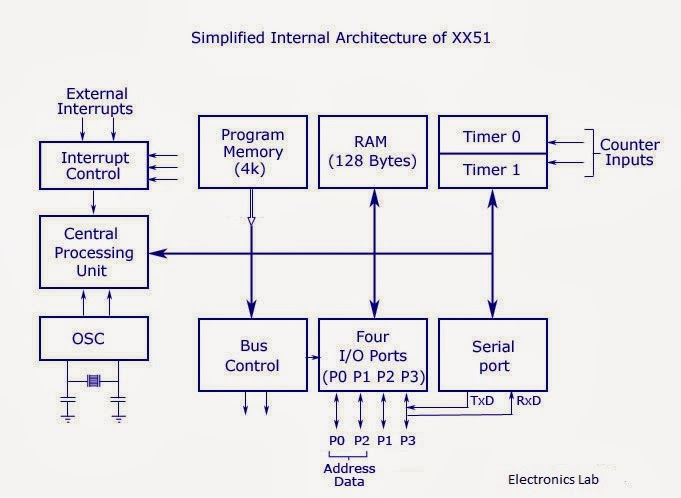
There is no need of any detailed explanation to understand internal architecture of 8051 micro controller. Just look at the diagram above and you observer it carefully. The system bus connects all the support devices with the central processing unit. 8051 system bus composes of an 8 bit data bus and a 16 bit address bus and bus control signals. From the figure you can understand that all other devices like program memory, ports, data memory, serial interface, interrupt control, timers, and the central processing unit are all interfaced together through the system bus. RxD and TxD (serial port input and output) are interfaced with port 3.

8051 Memory Organization

Before going deep into the memory architecture of 8051, lets talk a little bit about two variations available for the same. They are Princeton architecture and Harvard architecture. Princeton architecture treats address memory and data memory as a single unit (does not distinguish between two) where as Harvard architecture treats program memory and data memory as separate entities. Thus Harvard architecture demands address, data and control bus for accessing them separately where as Princeton architecture does not demand any such separate bus.
Example:- 8051 micro controller is based on Harvard architecture and 8085 micro processor is based on Princeton architecture.
Thus 8051 has two memories :- Program memory and Data memory

Program memory organization


Now lets dive into the program memory organization 0f 8051. It has an internal program of 4K size and if needed an external memory can be added (by interfacing ) of size 60K maximum. So in total 64K size memory is available for 8051 micro controller.  By default, the External Access (EA) pin should be connected Vcc so that instructions are fetched from internal memory initially. When the limit of internal memory (4K) is crossed, control will automatically move to external memory to fetch remaining instructions. If the programmer wants to fetch instruction from external memory only (bypassing the internal memory), then he must connect External Access (EA) pin to ground (GND).
You may already know that 8051 has a special feature of locking the program memory (internal) and hence protecting against software piracy. This feature is enable by program lock bits. Once these bits are programmed, contents of internal memory can not be accessed using an external circuitry. How ever locking the software is not possible if external memory is also used to store the software code. Only internal memory can be locked and protected.  Once locked, these bits can be unlocked only by a memory-erase operation, which in turn will erase the programs in internal memory too.
8051 is capable of pipelining. Pipelining makes a processor capable of fetching the next instruction while executing previous instruction. Its some thing like multi tasking, doing more than one operation at a time. 8051 is capable of fetching first byte of the next instruction while executing the previous instruction.


Data memory organization


 In the MCS-51 family, 8051 has 128 bytes of internal data memory and it allows interfacing external data memory of maximum size up to 64K. So the total size of data memory in 8051 can be upto 64K (external)  +  128 bytes (internal).  Observe the diagram carefully to get more understanding. So there are 3 separations/divisions of the data memory:- 1) Register banks 2) Bit addressable area 3) Scratch pad area.


Register banks form the lowest 32 bytes on internal memory and there are 4 register banks designated bank #0,#1, #2 and #3. Each bank has 8 registers which are designated as R0,R1…R7. At a time only one register bank is selected for operations and the registers inside the selected bank are accessed using mnemonics R0..R1.. etc. Other registers can be accessed simultaneously only by direct addressing.  Registers are used to store data or operands during executions.  By default register bank #0 is selected (after a system reset).
The bit addressable ares of 8051 is usually used to store bit variables. The bit addressable area is formed by the 16 bytes next to register banks. They are designated from address 20H to 2FH (total 128 bits). Each bits can be accessed from 00H to 7FH within this 128 bits from 20H to 2FH. Bit addressable area is mainly used to store bit variables from application program, like status of an output device like LED or Motor (ON/OFF) etc. We need only a bit to store this status and using a complete byte addressable area for storing this is really bad programming practice, since it results in wastage of memory.
The scratch pad area is the upper 80 bytes which is used for general purpose storage. Scratch pad area is from 30H to 7FH  and this includes stack too.


8051 System Clock


An 8051 clock circuit is shown above.  In general cases, a quartz crystal is used to make the clock circuit. The connection is shown in figure (a) and note the connections to XTAL 1 and XTAL 2.  In some cases external clock sources are used and you can see the various connections above. Clock frequency limits (maximum and minimum) may change from device to device. Standard practice is to use 12MHz frequency. If serial communications are involved then its best to use 11.0592 MHz frequency.


Okay, take a look at the above machine cycle waveform. One complete oscillation of the clock source is called a pulse. Two pulses forms a state and six states forms one machine cycle. Also note that, two pulses of ALE are available for 1 machine cycle.

8051 Reset Circuit


 8051 can be reset in two ways 1) is power-on reset – which resets the 8051 when power is turned ON and 2) manual reset – in which a reset happens only when a push button is pressed manually. Two different  reset circuits are shown above. A reset doesn’t affect contents of internal RAM. For reset to happen, the reset input pin (pin 9) must be active high for atleast 2 machine cycles.  During a reset operation :- Program counter is cleared and it starts from 00H, register bank #0 is selected as default, Stack pointer is initialized to 07H, all ports are written with FFH.